Firecrawl Alternatives: 7 Search & Crawl APIs Compared (Pricing, Params, Geo & Language)
Looking for a Firecrawl alternative? Compare 7 leading search/crawl APIs by search price, parameter depth (geo, language, device, filters), and AI-readiness. Includes Crawleo, DataForSEO, Serper.dev, SerpAPI, Tavily, Exa, and Perplexity Sonar.
 Ahmed Ellaban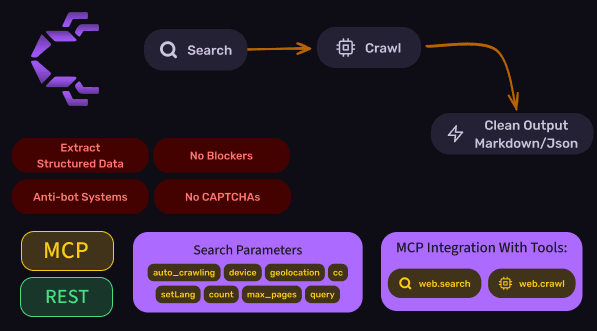
On this page
Table of contents
- Why teams look for Firecrawl alternatives
- At-a-glance: who wins on price vs parameters
- 1) Serper.dev
- 2) DataForSEO
- 3) Crawleo
- 4) SerpAPI
- 5) Tavily
- 6) Exa
- 7) Perplexity Sonar
- Recommendations
- Implementation tip
- Sources & references
Why teams look for Firecrawl alternatives
Firecrawl is commonly used to crawl URLs and turn pages into LLM-ready content. But many teams eventually need one (or more) of these:
- Cheaper search discovery at scale
- More query parameters (geo targeting, language, device, time filters, domain allow/deny lists)
- A cleaner split between “search → crawl/extract → normalize to Markdown/JSON”
- A tool that’s more “agent-native” (e.g., MCP integrations)
This guide compares 7 alternatives with a strong focus on search price and parameter flexibility.
At-a-glance: who wins on price vs parameters
Cheapest search discovery (best-case unit economics)
- Serper.dev: as low as $0.30 per 1,000 credits on high-volume packs (smaller packs cost more per 1K).
- DataForSEO SERP API: around $0.60 per 1,000 SERPs (Standard Queue, 1 SERP = 10 results), with granular geo/language/device parameters.
Most search parameters (geo + language + device + SERP knobs)
- DataForSEO (strongest “SEO-grade” controls).
Closest “Firecrawl-style” replacement (search + crawl + AI-ready output)
- Crawleo (search + optional crawling, output formats for RAG, plus MCP tooling).
1) Serper.dev— Cheapest Google SERP discovery at scale
What it is A low-cost Google Search API built around a simple JSON request model.
Search parameter depth (what you can control)
- Country and language targeting
- Query-location customization (Serper’s pricing page explicitly mentions customizing query location)
- Multiple result types (e.g., web, news, images, places) (availability varies by endpoint)
Note: Serper’s marketing page communicates the presence of location customization, but it does not publish a complete parameter schema in that section.
Pricing (search) Serper sells prepaid credit packs. Their public pricing examples include:
- $50 → 50,000 credits (~$1.00 / 1K)
- $700 → 1,000,000 credits (~$0.70 / 1K)
- $1,800 → 4,000,000 credits (~$0.45 / 1K)
- $3,750 → 12,500,000 credits (~$0.30 / 1K)
Pros
- Very strong price-per-search at high volume
- Simple integration for “discover URLs, then crawl elsewhere” pipelines
Cons
- Not a crawler/extractor (you still need a second step to fetch & clean content)
- Less transparent about advanced parameters on the main marketing page
Best for
- Cheapest Google SERP discovery + you already have your own crawler (or use Firecrawl/Crawleo for extraction)
2) DataForSEO — Most parameters + strongest geo/language/device targeting
What it is An SEO/marketing-grade API suite with SERP endpoints that expose a deep set of knobs for controlling exactly what you fetch.
Search parameters (examples from SERP endpoints)
keywordlocation_code/location_name(DataForSEO also provides location catalogs for targeting)language_code/language_namedevice(desktop/mobile)osdepth(result depth; billing can scale with depth/pages)- SERP-type-specific toggles depending on endpoint
Pricing (search) DataForSEO publishes per-SERP pricing (varies by mode/priority):
- Standard Queue: $0.0006 per SERP (10 results) → $0.60 per 1,000 SERPs
- Priority Queue: $0.0012 per SERP (10 results)
Pros
- Best-in-class parameter depth (geo + language + device + SERP-specific controls)
- Excellent fit for geo-specific, multi-market, or SEO analytics products
Cons
- Not “LLM-ready” by default (you usually still need to crawl/extract page content separately)
- Not built as an “AI ingestion” layer for RAG (it doesn’t handle content cleaning or Markdown/Text normalization for you—you’ll add a separate crawl/extract/clean step)
- Complexity: many endpoints, many modes, and cost depends on what you request
Best for
- Anything where search needs to be deterministic and configurable (local SEO, market intelligence, SERP monitoring)
3) Crawleo— Search + crawl + AI-ready outputs (with MCP)
What it is Crawleo is a privacy-first API for real-time search + crawling, designed for RAG pipelines and AI agents.
Key capabilities
Beyond standard link results, Crawleo can also surface richer SERP signals that can improve answer accuracy in AI apps—such as copilot-style answer blocks, sidebar/knowledge-panel-style data, and related questions / Q&A items.
Note: Availability depends on the query and what the upstream search engine returns for that SERP layout.
- Live web search
- Optional crawling of search results (
auto_crawling) - Multiple output formats optimized for LLMs (including Markdown)
- Native MCP support (tools like
web.searchandweb.crawl)
Search parameters (REST / MCP tool schema examples)
query(required)max_pages(pagination)count(results per page / count)setLang(language code)cc(country code)geolocationdevice(desktop/mobile/tablet)- Output toggles such as
markdown,raw_html,enhanced_html,page_text auto_crawling
Pricing (search) Public examples from the Crawleo MCP repo include:
- 10,000 searches → $20
- 100,000 searches → $100
- 250,000 searches → $200
Pros
- One vendor for search + crawl + clean output
- Practical knobs for language/country/device + AI-ready formats
- MCP makes it easy to plug into agent tooling and IDE assistants
Cons
- If you need “SEO-grade” SERP filtering across many engines/features, DataForSEO is deeper
Best for
- AI products that need an end-to-end pipeline: Search → Crawl → Clean Markdown/JSON → RAG
4) SerpAPI — Mature SERP coverage + strong location controls
What it is A widely used SERP API with broad Google result support and a stable developer ecosystem.
Search parameter depth (high-level) SerpAPI emphasizes controllability like:
- Location selection
- Language and country controls
- SERP-type knobs depending on engine (maps, news, shopping, etc.)
Pricing (search) Public pricing examples include:
- $75/month → 5,000 searches
- $150/month → 15,000 searches
- $275/month → 30,000 searches
Pros
- Mature product, stable docs, lots of SERP feature support
- Strong fit for SERP products that need structured outputs
Cons
SerpAPI is excellent for structured SERP JSON, but it isn’t a complete Firecrawl replacement for building RAG—you’ll still need a crawler + extraction + normalization.
- More expensive per-search than Serper/DataForSEO at scale
- No built-in content crawling/cleaning step (pair with a crawler)
Best for
- Feature-rich SERP extraction for analytics products
5) Tavily — Agent-friendly search with built-in content options
What it is A search API designed for AI agents, with optional “raw content” returns and answer generation.
Search parameters (from the Search endpoint)
search_depth(docs note thatadvanceduses 2 credits, and you can setbasicto avoid the extra cost)max_results- Time filtering:
time_range,start_date,end_date - Domain controls:
include_domains,exclude_domains - Content toggles:
include_answer,include_raw_content
Pricing (credits)
The docs explicitly call out that advanced search depth uses 2 credits per request.
Pros
- Friendly for agent workflows
- Built-in domain allow/deny + content toggles
Cons
- Not “SEO-grade” geo targeting (not a SERP control product)
- Credit-based pricing can be less predictable if you switch depths often
Best for
- Agent research flows and lightweight RAG prototypes
6) Exa — Semantic search with domain/date controls + priced per request
What it is A semantic web discovery API focused on relevance, with useful filters for narrowing results.
Search parameters (from the Search endpoint)
querytype(fast,auto,neural,deep)category(e.g.,news,pdf,github)userLocation(2-letter ISO country code)numResultsincludeDomains,excludeDomains
Pricing (search) Exa’s pricing page publishes price-per-1K request examples (which vary by search type and number of results).
Pros
- Strong discovery quality for semantic queries
- Useful constraints: domains + country signal
Cons
- Not a SERP API replacement if you need exact Google-style, geo-precise SERPs
- Cost can rise if you request large result counts or deep mode frequently
Best for
- Research discovery, semantic sourcing, and curated RAG collections
7) Perplexity — Answer-first retrieval with search controls (domains, context size)
What it is A chat-completions style API where Sonar models can retrieve and cite web sources, with controls over how search is used.
Search controls (from Perplexity docs)
search_domain_filterallowlist/denylist (domain filtering)search_typeoptions likefast,pro,auto(pricing varies by type and “search context size”)
Pricing (two parts) Perplexity publishes:
- Token pricing per model
- Request fees per 1,000 requests that vary by search type and search context size (Low/Medium/High)
Pros
- Strong for “answer + citations” experiences
- Domain filters help with governance (trusted sources only)
Cons
- Not designed for deterministic SERP extraction
- Limited explicit geo/language knobs compared to SERP-focused APIs
Best for
- Answer engines and research assistants where citations matter more than strict search determinism
Recommendations (based on your priorities)
If your #1 goal is the cheapest search discovery
- Cheapest search-only options: Serper.dev and DataForSEO usually win on unit economics.
- Important for AI apps: SERP APIs are typically not built as end-to-end AI data layers. You still need to fetch pages, strip boilerplate, normalize to Markdown/text, then chunk/dedupe for RAG.
If you need the most parameters (geo + language + device + SERP controls)
- DataForSEO is the strongest option.
If you want higher answer accuracy with richer SERP signals + AI-ready outputs
- Crawleo is the best fit when you want search + optional crawling + AI-ready formats and richer SERP signals (e.g., answer blocks, sidebar-style data, and related Q&A when available) to improve accuracy.
Practical implementation tip (best-of-both)
If you’re building a serious pipeline, a common architecture is:
- Search with Serper.dev or DataForSEO (depending on whether price or control matters most)
- Crawl/extract/clean with Crawleo (or Firecrawl) to normalize into Markdown/JSON
This gives you both cost-efficient discovery and LLM-friendly content.