
Gemma 4 Guide: How to Choose the Right Model & Run It Locally with Ollama
Google's Gemma 4 is one of the most capable open-source AI model families available today — and it runs completely free on your own hardware. In this guide, we break down each model variant, help you pick the right one for your setup, and walk you through a quick-start installation with Ollama.
 Khaled Hawwas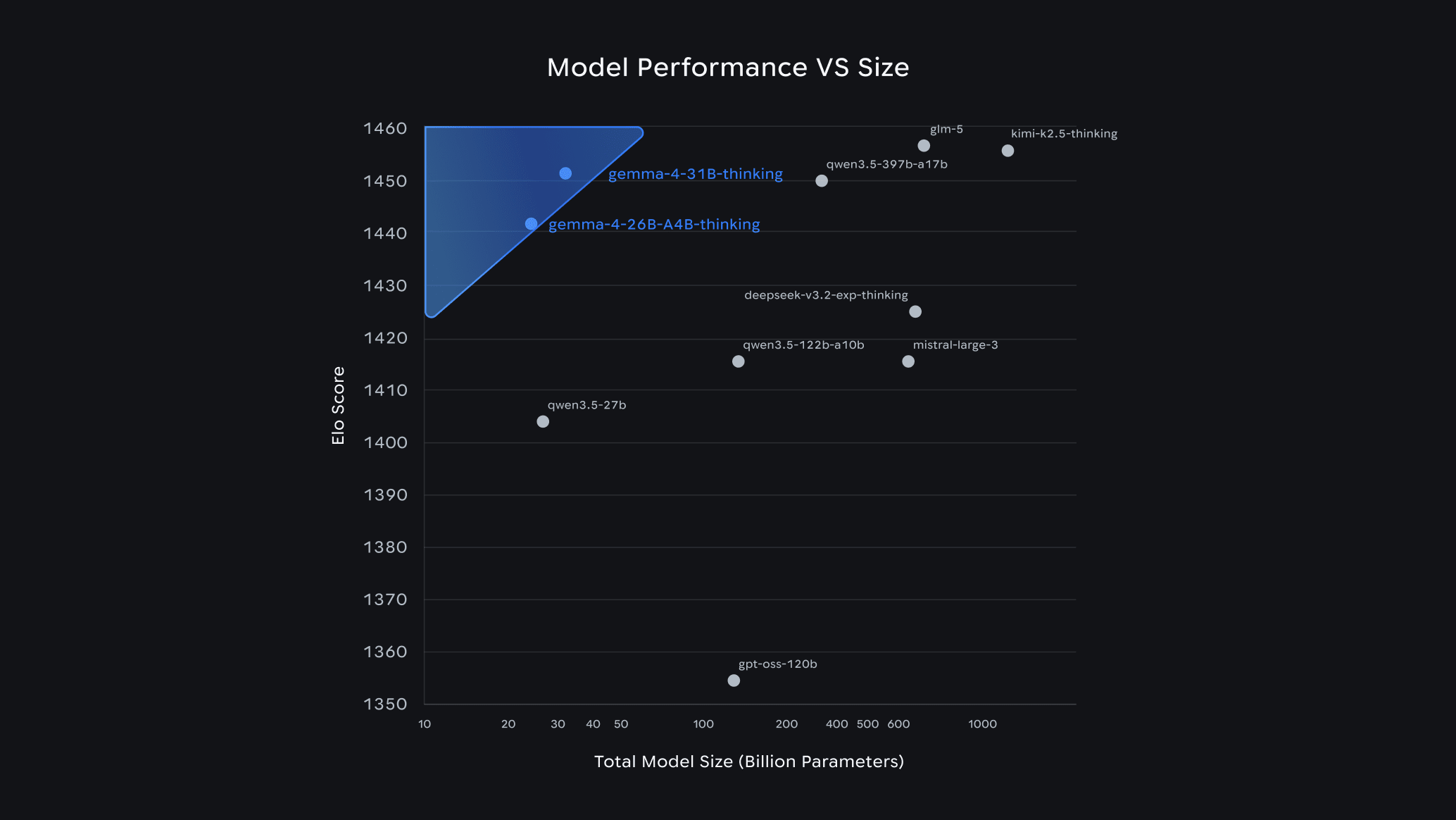
On this page
Gemma 4 Guide: How to Choose the Right Model & Run It Locally with Ollama
Google dropped Gemma 4 on April 2–3, 2026, and the developer community hasn't stopped talking about it since. Within 24 hours of launch, it ranked #3 among all open models on the Arena AI leaderboard — outcompeting models 20x its size. The best part? It's completely free, open-source under the Apache 2.0 license, and you can run it on your own laptop today using Ollama.
In this guide, we'll explain what Gemma 4 is, how to pick the right variant for your hardware, and how to get it running in minutes.
What Is Gemma 4?
Gemma 4 is Google DeepMind's latest open-source AI model family. Built from the same research that powers Gemini, it supports:
- Text, image, and audio input (on E2B and E4B variants)
- Native function calling with JSON schema — no prompt tricks needed
- Configurable thinking mode — enable chain-of-thought reasoning on-demand
- Context windows up to 256K tokens on larger variants
- Agentic workflows out of the box
Compared to Gemma 3, the jump is massive: the 31B model scores 80% on LiveCodeBench v6, up from 29.1% on Gemma 3 27B. Its Codeforces ELO jumped from 110 to 2150.
Gemma 4 Model Variants at a Glance
Gemma 4 comes in four sizes to fit different hardware and use cases:
| Model | Parameters | Disk Size | Min RAM | Best For |
|---|---|---|---|---|
gemma4:e2b | ~2B | 7.2 GB | 4–8 GB | Edge devices, IoT, audio/image tasks |
gemma4:e4b (default) | ~4B | 9.6 GB | 8–16 GB | Most laptops and developers |
gemma4:26b | 26B (3.8B active) | 18 GB | 20 GB+ | Best quality-per-GB (MoE architecture) |
gemma4:31b | 31B | 20 GB | 24 GB+ | Maximum quality, serious hardware |
Tip: The
26bmodel uses a Mixture of Experts (MoE) architecture — it has 26B total parameters but only activates 3.8B per token. That means you get near-13B quality at 4B speed. It's the smart pick for most power users.
How to Choose the Right Model
💻 You have a basic laptop (8GB RAM)
Go with gemma4:e4b — the default. It handles code review, Q&A, and generation tasks comfortably. If RAM is very tight, try gemma4:e2b (7.2 GB).
🖥️ You have a mid-range workstation (16–20 GB RAM or VRAM)
The gemma4:26b MoE variant is your sweet spot. With Q4_K_M quantization it fits in ~16 GB and performs like a 13B dense model at 4B speeds.
🔥 You have a high-end GPU (24GB+ VRAM) or Apple Silicon (32GB+)
Go all in with gemma4:31b. It competes with cloud models on most coding and reasoning tasks, and scores 85.2% on MMLU Pro.
📱 You're building for edge / mobile / IoT
Use gemma4:e2b — it supports audio and image input, runs on 4GB RAM, and is optimized for low-latency on-device inference.
Rule of thumb: Start with e4b. If it feels slow or quality isn't enough, scale up to 26b.
Quick Start: Running Gemma 4 with Ollama
Step 1 — Install Ollama
Ollama is the easiest way to run local LLMs. One install, one command.
macOS:
brew install ollama
Linux:
curl -fsSL https://ollama.com/install.sh | sh
Windows: Download the .exe installer from ollama.com.
Then start the service:
ollama serve
Make sure you're on Ollama v0.20.0 or later — earlier versions don't support Gemma 4. Check with:
ollama --version
Step 2 — Pull Your Gemma 4 Model
# Default (E4B — best for most users)
ollama pull gemma4

# MoE variant (best quality-to-size, needs 20GB+)
ollama pull gemma4:26b

# Full flagship (needs 24GB+)
ollama pull gemma4:31b

# Smallest model (edge / limited hardware)
ollama pull gemma4:e2b
Download sizes range from ~7 GB (E2B) to ~20 GB (31B).
Step 3 — Run It
ollama run gemma4
That's it. You're now running a top-3 open-source AI model, completely offline, for free. Try asking it something practical:

